
Miraplacid Text Driver
Miraplacid Text Driver 2025 extracts text from any printable documents. After installation on your PC, Miraplacid Text Driver appears as a new printer in your system. When document is printed, Miraplacid Text Driver opens a dialog with Preview Window. You can save resulting text to file, upload to FTP or HTTP server, email it as a message text or attachment, print it to a real printer, or send to Clipboard.
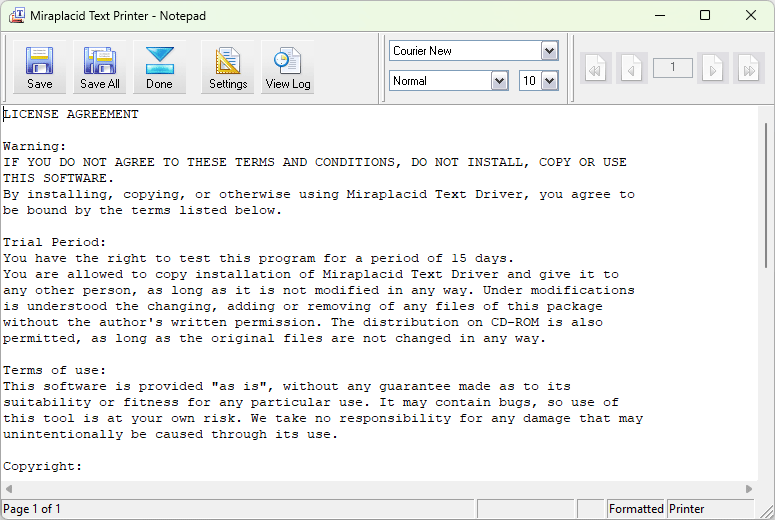
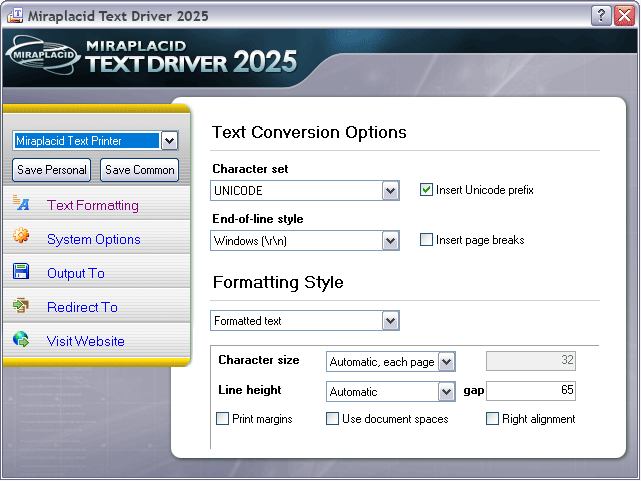
You can save the extracted information as plain, formatted text or as XML or RSS / Atom feed for future processing in all installed codepages and Unicode.
On Windows 10+, Miraplacid Text Driver 2025 includes OCR capability. It can extract text from image only print jobs or jobs which do not contain text.
Purchase Miraplacid Text Driver 2025
Important information
Old versions (before 2025) has been discontinued. It means that it's not possible to download, puchase and get support for these versions.
If you have really critial need of old version, please, contact us - we will try to help.
New in version 2025 (8.0)
- Printer driver in version 2025 is color printer. That means, you can redirect your jobs to color printers as-is.
- Version 2025 includes OCR feature on Windows 10+. Now, Text Driver will extract text from any printing applications.
- Programming interface accepts any kind of integer values, including 64-bit.
- Rendering plugin 2D discontinued and removed from Text Driver.
- Several bugs fixed and improvements made in software and documentation.
Is something still missing? Request a feature
Online documentation
Miraplacid Text Driver 2025:
- Miraplacid Text Driver 2025 About
- Miraplacid Text Driver 2025 Installation
- Miraplacid Text Driver 2025 Registration Dialog
- Miraplacid Text Driver 2025 Activation Dialog
- Miraplacid Text Driver 2025 Advanced Settings
- Miraplacid Text Driver 2025 Main Preview Window
- Miraplacid Text Driver 2025 Settings Dialog
- Miraplacid Text Driver 2025 Text Formatting Settings
- Miraplacid Text Driver 2025 System Settings
- Miraplacid Text Driver 2025 Output To: Settings
- Miraplacid Text Driver 2025 Redirect To: Settings
- Miraplacid Text Driver 2025 Scripting Guide
- Miraplacid Text Driver 2025 Useful solutions
- Miraplacid Text Driver 2025 Use-cases
Our Awards
Miraplacid Text Driver Awards and Reviews
Support
Miraplacid Text Driver 2025 includes all the features missed in previous versions you asked for. If you think that something is still missing, please email us and we will do our best to add it to the next version of Miraplacid Text Driver.
If you need support, or have questions or suggestions, contact us via e-mail support@miraplacid.com
OCR comments
If print job does not contain text, Miraplacid Text Driver converts print job pages to images and extracts text from from these images. This method of text exctraction does not guarantee 100% of text restoration accuracy and its quality is hightly dependent of used fonts, document layout and content density. To use this method successfully in automatic mode, you need to print several test document of the same kind and verify that everything recognized ok. Please, test quality and correctness of documents generated with OCR.